 cd243fd0d2
## Description

Closes: #11944


---

### Author Checklist

*All items are required. Please add a note to the item if the item is not applicable and
please add links to any relevant follow up issues.*

I have...

- [ ] included the correct [type prefix](https://github.com/commitizen/conventional-commit-types/blob/v3.0.0/index.json) in the PR title
- [ ] added `!` to the type prefix if API or client breaking change
- [ ] targeted the correct branch (see [PR Targeting](https://github.com/cosmos/cosmos-sdk/blob/main/CONTRIBUTING.md#pr-targeting))
- [ ] provided a link to the relevant issue or specification
- [ ] followed the guidelines for [building modules](https://github.com/cosmos/cosmos-sdk/blob/main/docs/building-modules)
- [ ] included the necessary unit and integration [tests](https://github.com/cosmos/cosmos-sdk/blob/main/CONTRIBUTING.md#testing)
- [ ] added a changelog entry to `CHANGELOG.md`
- [ ] included comments for [documenting Go code](https://blog.golang.org/godoc)
- [ ] updated the relevant documentation or specification
- [ ] reviewed "Files changed" and left comments if necessary
- [ ] confirmed all CI checks have passed

### Reviewers Checklist

*All items are required. Please add a note if the item is not applicable and please add
your handle next to the items reviewed if you only reviewed selected items.*

I have...

- [ ] confirmed the correct [type prefix](https://github.com/commitizen/conventional-commit-types/blob/v3.0.0/index.json) in the PR title
- [ ] confirmed `!` in the type prefix if API or client breaking change
- [ ] confirmed all author checklist items have been addressed
- [ ] reviewed state machine logic
- [ ] reviewed API design and naming
- [ ] reviewed documentation is accurate
- [ ] reviewed tests and test coverage
- [ ] manually tested (if applicable)
2.8 KiB
Cosmos SDK Dependency Injection depinject Module
Overview
depinject is a dependency injection framework for the Cosmos SDK. This module together with core/appconfig are meant
to simplify the definition of a blockchain by replacing most of app.go's boilerplate code with a configuration file (YAML or JSON).
Usage
depinject example
package main

import (
	"fmt"

	"cosmossdk.io/depinject"
)

type AnotherInt int

func main() {
	var (
	  x int
	  y AnotherInt
	)

	fmt.Printf("Before (%v, %v)\n", x, y)
	depinject.Inject(
		depinject.Provide(
			func() int { return 1 },
			func() AnotherInt { return AnotherInt(2) },
		),
		&x,
		&y,
	)
	fmt.Printf("After (%v, %v)\n", x, y)
}
Full example in real app
//go:embed app.yaml
var appConfigYaml []byte

var appConfig = appconfig.LoadYAML(appConfigYaml)

func NewSimApp(
	logger log.Logger,
	db dbm.DB,
	traceStore io.Writer,
	loadLatest bool,
	skipUpgradeHeights map[int64]bool,
	homePath string,
	invCheckPeriod uint,
	encodingConfig simappparams.EncodingConfig,
	appOpts servertypes.AppOptions,
	baseAppOptions ...func(*baseapp.BaseApp),
) *SimApp {
	app := &SimApp{
		invCheckPeriod: invCheckPeriod,
	}

	var (
		appBuilder *runtime.AppBuilder
		msgServiceRouter *baseapp.MsgServiceRouter
	)

	err := depinject.Inject(AppConfig,
		&appBuilder,
		&app.ParamsKeeper,
		&app.CapabilityKeeper,
		&app.appCodec,
		&app.legacyAmino,
		&app.interfaceRegistry,
		&app.AccountKeeper,
		&app.BankKeeper,
		&app.FeeGrantKeeper,
		&app.StakingKeeper,
		&msgServiceRouter,
	)
	if err != nil {
		panic(err)
	}
...
Debugging
Issues with resolving dependencies in the container can be done with logs
and Graphviz renderings of the container tree. By default, whenever there is an error, logs will
be printed to stderr and a rendering of the dependency graph in Graphviz DOT format will be saved to
debug_container.dot.
Here is an example Graphviz rendering of a successful build of a dependency graph:
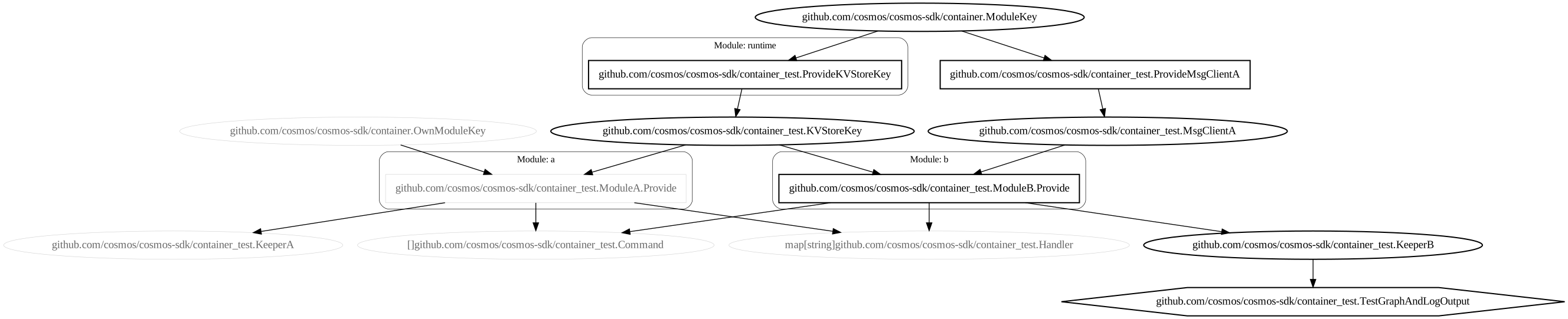
Rectangles represent functions, ovals represent types, rounded rectangles represent modules and the single hexagon
represents the function which called Build. Black-colored shapes mark functions and types that were called/resolved
without an error. Gray-colored nodes mark functions and types that could have been called/resolved in the container but
were left unused.
Here is an example Graphviz rendering of a dependency graph build which failed:

Graphviz DOT files can be converted into SVG's for viewing in a web browser using the dot command-line tool, ex:
> dot -Tsvg debug_container.dot > debug_container.svg
Many other tools including some IDEs support working with DOT files.