 2515878eeb
* Remove unnecessary todos * Set option to log commands in shell scripts * Replace fixturenet-eth dependency with wait on endpoint * Skip lighthouse node dependency check * Update all services in the stack * Use debug flag to enable shell commands logging * Add bash in op-batcher container * Update mobymask-v2 instructions * Update fixturenet-optimism instructions * Add descriptions for services * Move ts files to container-build * Take L1 RPC endpoint from the env file * Add dev mode restriction for editing env file |
||
|---|---|---|
| app | ||
| docs | ||
| scripts | ||
| tests/smoke-test | ||
| .gitignore | ||
| cli.py | ||
| LICENSE | ||
| MANIFEST.in | ||
| README.md | ||
| requirements.txt | ||
| setup.py | ||
| tox.ini | ||
Stack Orchestrator
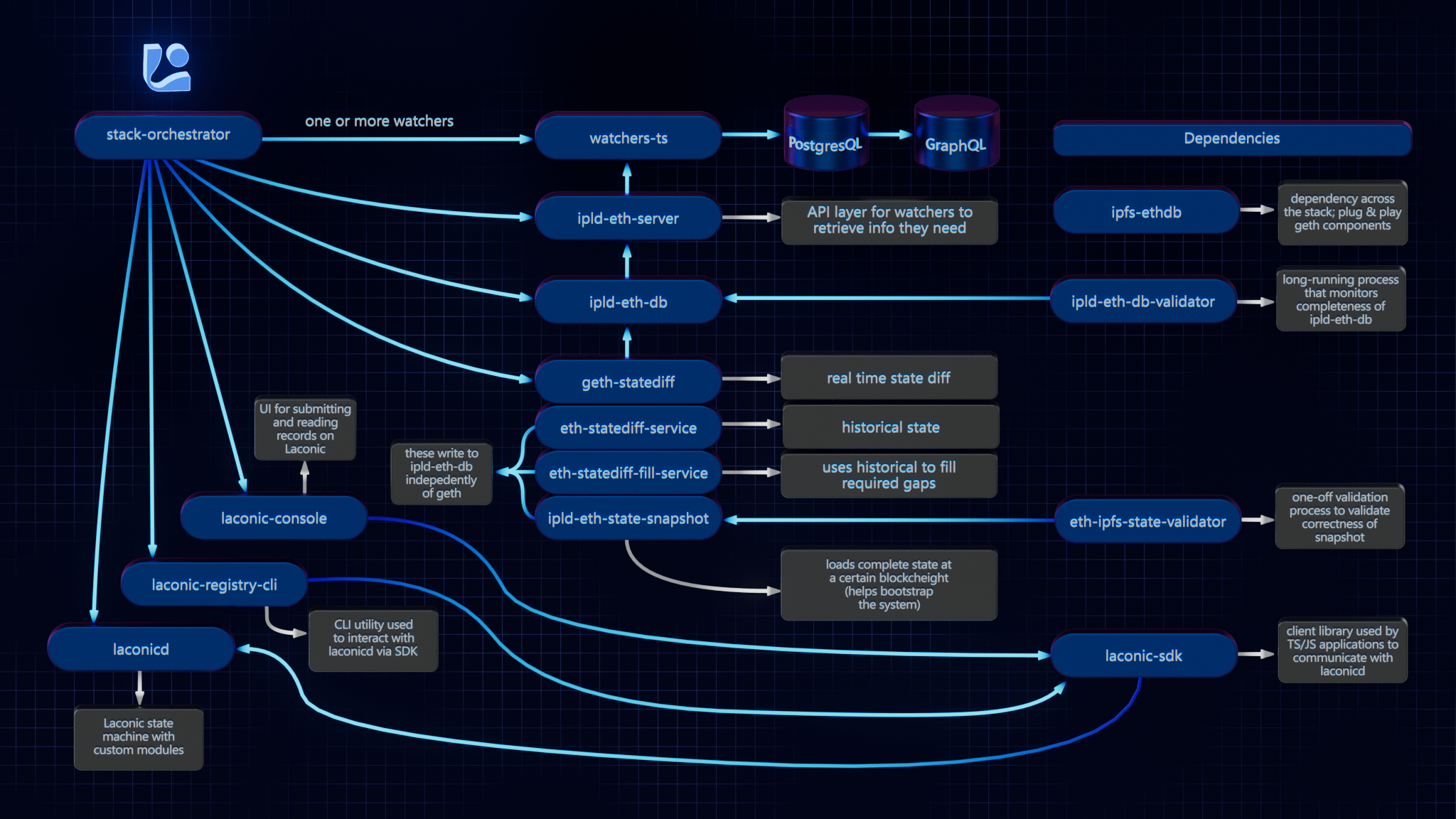
Stack Orchestrator allows building and deployment of a Laconic Stack on a single machine with minimial prerequisites. It is a Python3 CLI tool that runs on any OS with Python3 and Docker. The following diagram summarizes the relevant repositories in the Laconic Stack - and the relationship to Stack Orchestrator.
Install
Ensure that the following are already installed:
- Python3:
python3 --version>=3.8.10(the Python3 shipped in Ubuntu 20+ is good to go) - Docker:
docker --version>=20.10.21 - jq:
jq --version>=1.5
Note: if installing docker-compose via package manager on Linux (as opposed to Docker Desktop), you must install the plugin, e.g. :
mkdir -p ~/.docker/cli-plugins
curl -SL https://github.com/docker/compose/releases/download/v2.11.2/docker-compose-linux-x86_64 -o ~/.docker/cli-plugins/docker-compose
chmod +x ~/.docker/cli-plugins/docker-compose
Next decide on a directory where you would like to put the stack-orchestrator program. Typically this would be
a "user" binary directory such as ~/bin or perhaps /usr/local/laconic or possibly just the current working directory.
Now, having selected that directory, download the latest release from this page into it (we're using ~/bin below for concreteness but edit to suit if you selected a different directory). Also be sure that the destination directory exists and is writable:
curl -L -o ~/bin/laconic-so https://github.com/cerc-io/stack-orchestrator/releases/latest/download/laconic-so
Give it execute permissions:
chmod +x ~/bin/laconic-so
Ensure laconic-so is on the PATH
Verify operation (your version will probably be different, just check here that you see some version outut and not an error):
laconic-so version
Version: v1.0.27-7831078
Usage
Three sub-commands: setup-repositories, build-containers and deploy-system are generally run in order. The following is a slim example for standing up the erc20-watcher. Go further with the erc20 watcher demo and other pieces of the stack, within the stacks directory.
Setup Repositories
Clone the set of git repositories necessary to build a system:
laconic-so --stack erc20 setup-repositories
This will default to cloning git reposiories into: ~/cerc or - if set - the environment variable CERC_REPO_BASE_DIR
Build Containers
Build the set of docker container images required to run a system. It takes around 10 minutes to build all the containers from scratch.
laconic-so --stack erc20 build-containers
Deploy System
Uses docker compose to deploy a system (with most recently built container images).
laconic-so --stack erc20 deploy-system up
Check out he GraphQL playground here: http://localhost:3002/graphql
See the erc20 watcher demo to continue further.
Cleanup
laconic-so --stack erc20 deploy-system down
Contributing
See the CONTRIBUTING.md for developer mode install.
Platform Support
Native aarm64 is not currently supported. x64 emulation on ARM64 macos should work (not yet tested).